Online class scheduling software for effortless class bookings
Our free plan is free forever.


Class scheduling and booking made effortless
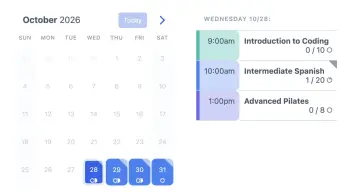
Our class scheduling software is designed with the flexibility to meet the intricate needs of your business. Whether you’re coordinating a company training, online classes, sports classes, our service can be tailored to fit your needs.
Easily connect with a wide range of calendar applications, ensuring that teachers and trainers are always up-to-date without the hassle of manual updates.
Starting at just $ 9 per month, our solution is designed to grow with your school.
Unlike other solutions our paid plans simply include all features and there are no per-seat fees.



“Amazing, amazing, amazing!!! I conduct photography workshops and scheduling is always a nightmare. When I ran a recent promotional, almost 500 people signed up and I knew I had to find an online scheduling system that worked.
On a friend’s recommendation, I decided to give SuperSaaS a try. We were off to a rough start in scheduling, but it was an error on my end that SuperSaaS figured out quickly and helped me correct. LOVE this system and without it, I would not be able to get the scheduling done without a ton of help. Best system out there bar none.”
No per-seat fees
Add unlimited staff
and schedules
Trusted
Trusted by 205,000+
companies
Localized
For 35 languages and all
time zones
Secure & reliable
Secure, backed up,
over 99.99% up-time
Class booking software built for every type of class or course
Visual & Performing Arts
Sports
Recreation & Crafts
Education
Why use scheduling software for classes?

Schedule classes with greater efficiency and fewer admin tasks
A key advantage of class scheduling software is the time saved on booking management. Students self-book online 24/7, eliminating back-and-forth emails and reducing administrative overhead for instructors.
- Reduce admin tasks: automate your booking process to focus more on creating and teaching.
- Minimize no-shows: automatically send booking confirmations and reminders to ensure students attend their booked sessions.
- Maximize attendance: implement a waiting list to fill spots efficiently and keep your classes full.
- Flexible bookings: use flexible scheduling options for individual reservations or a series of classes, catering to both casual learners and dedicated students.
- Diverse class formats: manage one-on-one sessions or group workshops, allowing multiple students to sign up for the same class.
Flexible payment options to grow your business
Let the class scheduling software handle payments upfront and discover new commercial opportunities to grow your business.
- Payments: offer one-off payments or class packages for ongoing students.
- Class packages: sell blocks of classes at a discount to encourage ongoing participation and commitment.
- Dynamic pricing: set different rates and discount rules for peak seasons or slower periods to balance your bookings.
- Promotions: attract new students with special offers and discount coupons, like “First class free” or “Book 10 sessions, get 1 free”.
- Additional offerings: cross-sell supplies or offer special workshop sessions for an additional fee to increase revenue.
Class booking software built for teachers and independent instructors
Based on feedback from clients in education and training, we’ve tailored our class scheduling software to meet the specific needs of teachers and instructors, ensuring a seamless online booking experience.
- Unlimited instructors: if your organization has multiple instructors, each can manage their own schedule using separate access controls at no extra cost.
- Student profiles: capture student details with custom sign-up forms, including skill level and preferences. Use notes to track progress and attendance.
- Post-class follow-up: automatically send materials or tips after class as a follow-up, enriching the learning experience.
- Handle cancellations: set your policies for how students can change or cancel bookings, reducing administrative tasks on your end.
- Customizable: add images to your classes and edit all schedule colors to fit your style or brand.
Features of our online class scheduling and booking software
Student self-booking
Save time by predefining if and when students or attendees can book or reschedule classes without your involvement
Adapts to your business
All the functionality you need for classes such as automatically adding a Zoom or Google Meet link to a class
Custom layout & forms
Completely customize the layout and ask specific information that you need as part of a booking such as skill level or qualifications
Add to your website
Integrate your class calendar on your own (responsive) website e.g., via JavaScript or WordPress plugin and match to your branding
Confirmations & reminders
Confirm bookings and send reminders by e-mail or SMS so no one forgets. Receive notifications when changes are made
Your business, your rules
Whether you want to set cancellation policies, booking rules, or special discounts, SuperSaaS allows you to control every aspect of your scheduling process
Many payment options
Ask customers to pay at the time of booking, use credits, or send an invoice afterwards through your own payment provider
Combine or synchronize calendars
Combine availability from multiple calendars, link your Google or Outlook Calendar, so appointments there show up as unavailable on your SuperSaaS schedule
Calendar customization galore
Add attendees to a waiting list, add buffer time, create recurring classes
User management
Set separate access levels for team members or create user groups with access to specific schedules
Reporting & analytics
Gain insights into your past and upcoming booking traffic, or export data to various apps, such as Excel
Security & reliability
Your data is safe and stored GDPR-compliant, with automatic backups and 24/7 monitoring
Easily add online booking to your website
Connect your class scheduling system with your favorite apps and software
Explore the range of powerful integrations that make SuperSaaS the most flexible class scheduling software available.
 Microsoft 365
 AI assistants


 Google Meet
 Zoom
Zoom
 WordPress
 Twilio
 PayPal
 Stripe


Trusted by thousands of instructors and training providers worldwide


- Art Studios
- Painting Classes
- Drawing Classes
- Sculpture Classes
- Pottery Classes
- Photography Classes
- Digital Art Classes
- Jewelry Making Classes
- Textile and Fabric Arts Classes
- Glass Blowing Classes
- Woodworking Classes
- Metalworking Classes
- Performance Art Workshops
- Art History Lectures
- Graphic Design Workshops
- Film Making Workshops
- Animation Workshops
- Calligraphy Workshops
- Yoga Classes
- Pilates Classes
- Swimming Lessons
- Tennis Lessons
- Martial Arts Classes
- Gymnastics Classes
- Spinning Classes
- Running Clinics
- Language Courses
- Computer Programming Courses
- Music Lessons
- Dance Classes
- Public Speaking Workshops
- Business Skills Training
- and more…

Talking to a long time customer
Kate Dahl is a job coach living in Denmark and is originally from the United States. She has become a job consultant for people looking for a new opportunity. Kate started using SuperSaaS in 2020 to schedule her appointments online.
Read Kate’s storyPay for bookings, not seats or features
Most scheduling tools charge per user or per seat, so your costs rise as your team grows. SuperSaaS charges for usage, so you can add unlimited staff, locations and schedules without paying more per person. Plus, only SuperSaaS includes every feature on every plan.
| Scheduling tool | Pricing model | Starting price | Unlimited staff & schedules |
|---|---|---|---|
 |
Usage-based, by future bookings | $ 9 / mo | Yes |
 |
Per user. Features per tier | $ 12 / mo / user | No |
 |
Per user. Features per tier | $ 12 / mo / user | No |
 |
Tiered plans, by bookings and features | $ 13.90 / mo | No |
 |
Tiered plans. Users per tier | $ 20 / mo | No |
 |
Per user. Features per tier | $ 9 / mo | No |
Competitor pricing reflects publicly listed entry plans, maintained on our detailed comparison and last reviewed August 2026. Starting prices are based on monthly billing. Per-user and per-seat plans multiply with team size, while your SuperSaaS price depends on booking volume, not headcount.
Frequently asked questions
The answers you never knew you needed
General questions
Can students only see the classes for their level?
Yes. You can put beginner, intermediate and advanced classes in separate schedules and use user groups, so each student only sees and books the classes for their level. When a student moves up a level, you move them to the next group.
Do I need to have my own website?
SuperSaaS can be integrated seamlessly into any site, if you don’t have a website (yet) you can also use the link to a SuperSaaS schedule directly, add it to your email signature, share it via WhatsApp, or put it on your Facebook or Instagram page.Do you have a mobile app?
When you (or your clients) visit a schedule with a mobile device, such as an iPhone or Android, the software will automatically show a version optimized for handheld devices.
You can also display your calendar using an icon on the home screen of an iPad or iPhone. It will look like an app, but you don’t need to visit the App Store to download it. See the information on mobile devices for details.
Can I assign a teacher to each class?
Yes. Each class can be linked to a teacher, so it is only offered when that teacher is available and no teacher is ever booked for two classes at once. Teachers can manage their own classes as superusers.
How do I take attendance for a class?
Open the class in SuperSaaS to see the list of students, and mark each booking as attended or absent. You can print the class list or export it to a spreadsheet, and keep track of students who often miss class.
Subscriptions and billing
Is the free version really free?
SuperSaaS is 100% free to use indefinitely and doesn’t require credit card information to start. The free version is limited to 50 future appointments and advertisements are displayed on the calendar page, along with a few other limitations.Details can be found on the pricing page. You’re welcome to keep using the free service for private and non-commercial use.
Can I switch to a bigger or smaller plan?
You can upgrade or downgrade at any time, payments get adjusted automatically. You can even switch back to the free version if you don’t need the software for a while and return to it later. So seasonal businesses only need to subscribe when they’re in season.What happens if I exceed my appointment limit?
When you exceed the maximum number of appointments allowed on your subscription package the system will notify you by email. You then have three days to either upgrade the account or reduce the number of appointments (feel free to email us if you need more time).
We will never delete your upcoming appointments. If you still exceed your limit after three days then the system will no longer accept new appointments until the situation is rectified. All other functionality remains unchanged. So you, and your users, can still view and edit appointments that have already been entered.
Do you charge when my users pay for bookings?
If you would like clients to pay for appointments in advance, you can use the integrated online payment system. You can choose from several different payment providers, such as PayPal or Stripe or even offer a combination of multiple providers. They send payments to your bank account directly, deducting a charge for their service. The money does not pass through SuperSaaS, and we do not charge any fee.
It’s also possible to use the built-in “credit system” where clients buy credits beforehand which they subsequently use to book appointments.
More information can be found in our support documentation.
How does the appointment limit work for classes?
Each student who books a place in a class counts as one upcoming appointment, and classes without bookings do not count. For example, 10 classes a week with 12 students each, bookable two weeks ahead, add up to about 240 upcoming appointments, which fits the plan for 300 upcoming appointments at $ 18 per month. A booking stops counting once the class has taken place.
The benefits of class scheduling software for your business
Increased efficiency
Automating the booking process removes the need for someone to manually take calls and coordinate schedules, saving time and reducing human error such as overbooking.
Happy customers
Instant class booking at any time eliminates the need for back-and-forth communication. This kind of self-service capability is usually preferred by customers in today’s digital world.
Decreased no-shows
Automatic reminders through emails or text messages significantly cut down on forgotten or missed classes, making sure that your business operates at maximum capacity.